


The Weather Channel - Radar
4.6550.50K Reviews
App Specs
- Version
- 16.26.0
- Updated On
- License
- Free
- Downloads
- 100,000,000+
- Developer
- The Weather Channel
- Categories
- Weather
- Platform
- Android, iOS
Screenshots
 Analysis by AppCompare
I judge a weather app by whether it helps me make a decision, not by how many numbers it can put on a screen. For a quick check, I want to know whether to bring a jacket; before a longer trip, I want enough context to spot a change in conditions. The Weather Channel - Radar aims to cover both needs, pairing a glanceable forecast with maps and alerts. That breadth is useful, though it also means the app is better suited to people who like detail than to anyone who wants the smallest possible weather widget.
What I look for in a daily forecast
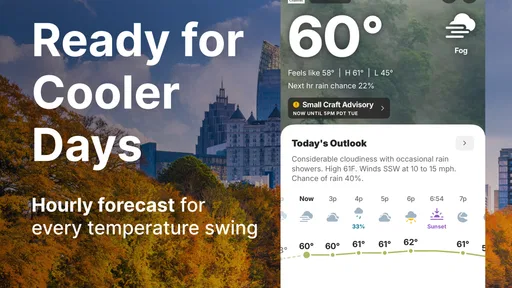
A forecast is most useful when it answers a practical question: should I leave earlier, change my route, or move an outdoor plan indoors? I find it helpful to check the hourly outlook for the part of the day I care about, then use the radar view when rain or a storm might affect my plans. Looking at those views together is more actionable than treating a single temperature as the whole story.
That workflow also keeps expectations sensible. A forecast is guidance, not a promise that conditions will unfold exactly as shown. Longer-range outlooks can help me think ahead, but I would not make a fixed outdoor plan far in advance based on one forecast alone. I check again closer to the event, especially when the weather could change quickly.
Guides and Analysis on The Weather Channel - Radar
Where this app earns its place
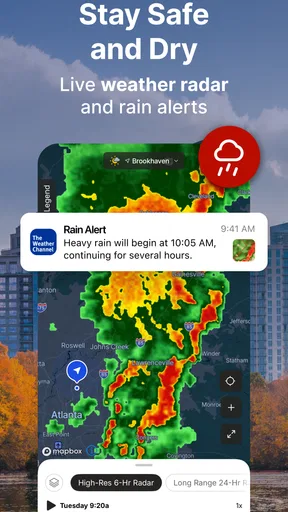
The app comes from The Weather Channel, a weather-focused developer, and its broad mix of forecast information and radar makes it appealing if you like to investigate rather than just glance. The map is the part I would reach for when timing matters: zooming into the area around a commute or a walk can make an approaching band of weather easier to understand than a general rain icon. It gives the forecast a useful geographic context.
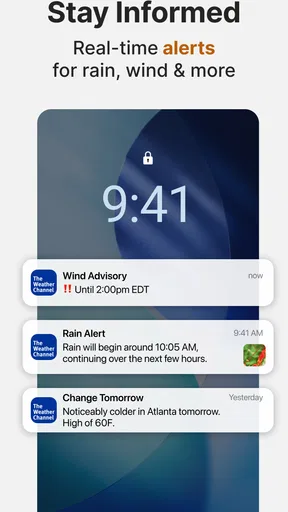
Alerts are valuable when I cannot keep checking the screen. I would tailor them to the kinds of conditions that could actually change my plans, rather than enabling every possible notification. That makes the app less noisy and gives important warnings a better chance of standing out. For someone who works outdoors, travels across town, or has a long walk to school or work, that distinction can matter more than having another forecast panel to browse.
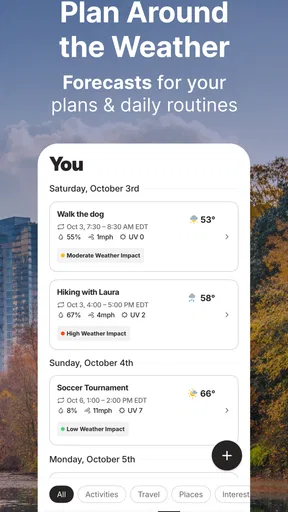
Imagine I have a picnic planned after work. I can check the hourly forecast in the morning, look at the radar before leaving, and reconsider if a weather alert arrives. If the outlook is unsettled, I can keep a backup indoor plan instead of assuming the morning forecast will hold all day. This is a more realistic way to use a weather app than expecting it to decide for me.
How it compares with simpler weather options
Compared with a basic built-in weather app, this one is a better fit if I want to move from a quick summary to a closer look at the map and additional forecast details. A simpler option may be preferable when I only need the current conditions and do not want to spend time navigating extra information. The right choice depends on whether those extra views help with decisions I actually make.
Worth Reading Before You Choose

Switching to Android Auto Means Rethinking Your Driving Routine

Google Calendar Makes a Crowded Week Easier to Manage

Ludo King Makes the Most of the Minutes Between Plans

Baby Panda World Brings Quick Play to Modern Phones, but Its Game Library Feels Busy

ESPN’s Live Game View Makes Following Close Games Easier

QuizzLand Review: A Good Fit for Short Trivia Breaks, Not Every Player
It also suits a different habit than a dedicated radar viewer. If I mainly want to inspect weather movement, a focused map experience may feel more direct; if I want radar alongside everyday forecast details, this app brings those needs together. I would not assume that a more detailed display automatically makes a forecast more certain. I use the map to add context, not to treat every moving patch as a precise prediction for my street.
Useful details, with a little restraint
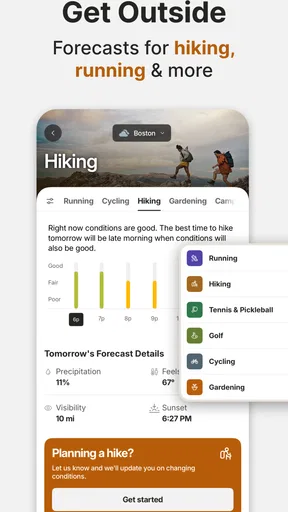
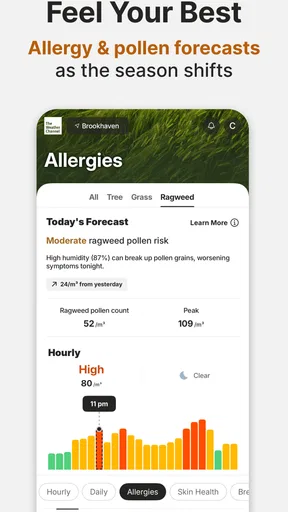
The daily forecast includes information such as wind, UV conditions, and pollen, which can be more relevant than temperature for particular plans. On a sunny day, for example, UV information may affect how long I intend to be outside; during allergy season, pollen details can help me decide whether a long outdoor workout is appealing. Sunrise and sunset information can also help with planning a walk before dark. These are worthwhile extras when they match a real need, not details I have to check every day.
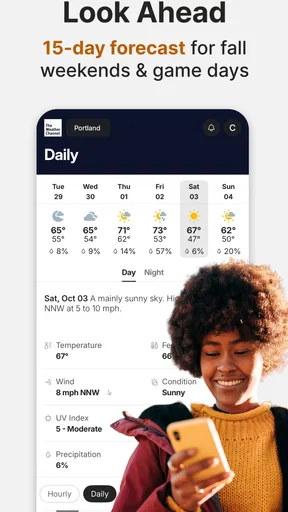
The longer outlook is best treated as a planning aid rather than a firm schedule. I might use it to choose which day looks more promising for an outing, then check the nearer-term forecast before committing. That habit avoids a common trap: reading a forecast several days out as though it were a guarantee. Radar is most helpful for understanding what appears to be moving through the area now; it does not remove uncertainty about what comes next.
There is a practical trade-off in having so much available. More panels and layers can make the app feel busy if all I want is a one-second answer. I would start with the home forecast, learn where the radar and alerts sit, and ignore sections that do not serve my routine. Customizing notifications is especially useful here: choosing only relevant alerts can keep the app from becoming another source of interruptions.
Who should choose it, and who may not
I would recommend it to people who regularly plan around changing weather, want a radar map close at hand, or value having several kinds of forecast information in one place. It can also suit households coordinating outdoor errands or activities, since a quick check before leaving can help everyone make a better call. Its broad reach is reflected in an average rating of 4.6 from around 3.4 million ratings, with more than 100 million installs.
On the other hand, I would steer someone toward a simpler alternative if they dislike busy screens, only check the temperature occasionally, or do not want an app that includes advertising in its free version. Ads can interrupt the clean flow of checking a forecast, so that is a real drawback rather than a minor detail for every user. The app is free to install, rated for Everyone, and offers in-app purchases ranging from $0.99 to $29.99 per item; I would look at the purchase choices in the app before deciding whether any paid option is worthwhile for my own routine.
Switching from another weather app is straightforward in concept, but there is still a small habit cost: I need to learn where its radar, forecast details, and alert controls are, then decide which notifications deserve space on my phone. I would give it a few ordinary days before judging whether its extra detail is useful. If I keep opening the same few views and trust the alerts to help with decisions, the change has paid off; if I keep returning to a simpler app for a quick answer, the added breadth may not be worth it.
First Impressions
Right off the bat, the app’s interface is sleek and user-friendly. Navigating through the The Weather Channel - Radar feels intuitive, and you don’t need to be a tech guru to figure it out. The home screen greets you with essential weather details: temperature, humidity, and a handy hourly forecast. It’s like having a personal meteorologist in your pocket!
Features Galore
One of the standout features is the interactive radar map. You can zoom in and out, swipe through different regions, and even see live updates as weather systems move. It’s fascinating to watch storms roll in real-time. Plus, the radar’s precision is top-notch, providing accurate data that you can rely on.
Another cool feature is the weather alerts. Whether it’s a thunderstorm warning or a heat advisory, the app makes sure you’re the first to know. You can customize alerts based on your preferences, so you’ll only get notified about the weather events that matter most to you.
Detailed Forecasting
If you’re a detail-oriented person, you’ll appreciate the app’s deep dive into daily forecasts. It offers insights on wind speed, UV index, and even pollen levels. For those who love planning their week, the 15-day forecast is a handy tool. It’s like peeking into the future!
And for the climate enthusiasts out there, the app provides information on sunrise and sunset times, lunar phases, and even ocean tides. It’s perfect for planning everything from beach days to stargazing nights.
What’s the Catch?
While the app is pretty comprehensive, it does come with ads in the free version. They can be a bit distracting, but hey, that’s the trade-off for not paying a dime. If ads aren’t your thing, there’s a premium version that’s ad-free and offers additional features like advanced radar layers.
Final Thoughts
Overall, The Weather Channel - Radar is a must-have for anyone who wants to stay ahead of the weather. Its robust features and accurate forecasts make it a reliable companion for daily life. Whether you’re planning a picnic or just heading out for a jog, this app ensures you’re always prepared. So, if you haven’t already, give it a spin and see how it transforms your weather-watching experience!
Pros
- Accurate and up-to-date forecasts.
- Interactive radar with multiple layers.
- Customizable weather alerts.
- Detailed hourly and daily predictions.
- User-friendly interface with sleek design.
Cons
- Ads can be intrusive at times.
- Some features require premium subscription.
- Occasional slow loading of radar maps.
- Location services may drain battery.
- Limited offline functionality.
FAQs for The Weather Channel - Radar
What features does The Weather Channel app offer?
The Weather Channel app provides a comprehensive suite of features including real-time radar, hourly and 15-day forecasts, severe weather alerts, and local weather updates. It also offers a dynamic home screen with weather news and videos, along with customizable alerts and notifications for severe weather conditions.
Is The Weather Channel app free to use?
Yes, The Weather Channel app is free to download and use. However, it offers in-app purchases and a premium subscription called 'The Weather Channel Premium' that removes ads and provides additional features such as longer forecast periods and advanced radar options.
How accurate is the weather information provided by the app?
The Weather Channel app is known for its accuracy, leveraging data from a network of weather stations and satellites globally. It uses advanced algorithms to provide precise local forecasts and real-time updates. However, like any weather service, it may occasionally have discrepancies due to unforeseen weather changes.
Can I customize the notifications in The Weather Channel app?
Yes, the app allows users to fully customize notifications. You can set alerts for specific weather events such as rain, snow, or severe weather conditions. Users can also manage the frequency and type of notifications to suit their preferences, ensuring you receive only the information you find useful.
Does The Weather Channel app consume a lot of data or battery?
The Weather Channel app is designed to be efficient, but like any app with real-time updates and videos, it may consume moderate data and battery. Users can optimize settings, such as reducing video play or adjusting update frequency, to manage data and battery usage effectively.


